Change Operator Password
When you create an operator, you assign them a unique password. In the event that the operator has forgotten their password, or as part of a regular security hygiene program, you can change the quickly password.

NOTE: If you use more than one terminal, you will need to change the same operator password on each terminal.
To change a terminal operator password:
- From the main screen, touch Settings.

- Enter the merchant password and touch Confirm.
- Scroll to the Configure application section.
- Touch Application options.
- Scroll to the Clerk section.
- Touch Clerk management. The Clerk management screen appears, listing any existing operators.

- Locate the operator whose password you want to change and click the Edit icon.

- On the operator's configuration page, scroll to the Change password section and enter the current operator password in the Old password field.
- Enter a new 6-digit numeric password for the operator in the New password field.
Keep in mind the password requirements when setting the operator's new password. - Re-enter the new password in the Confirm new password field.
- Touch the Save button; the new password is saved and the Clerk management screen appears.
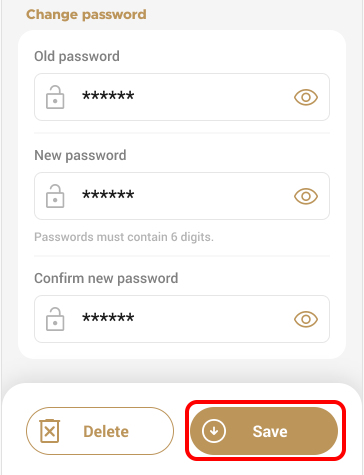
NOTE: If the current password is incorrect or you enter the new password incorrectly when confirming, a message appears and the terminal remains on the operator's configuration screen. Re-enter the password(s); if needed, touch the Show password icon to ensure you entered the correct password.
- If you have more than one terminal, repeat steps 1 to 11 for each additional terminal where you want to change the operator's password.
