Sales Item Setup - Taxes
This section is where taxes are assigned to the sales item.
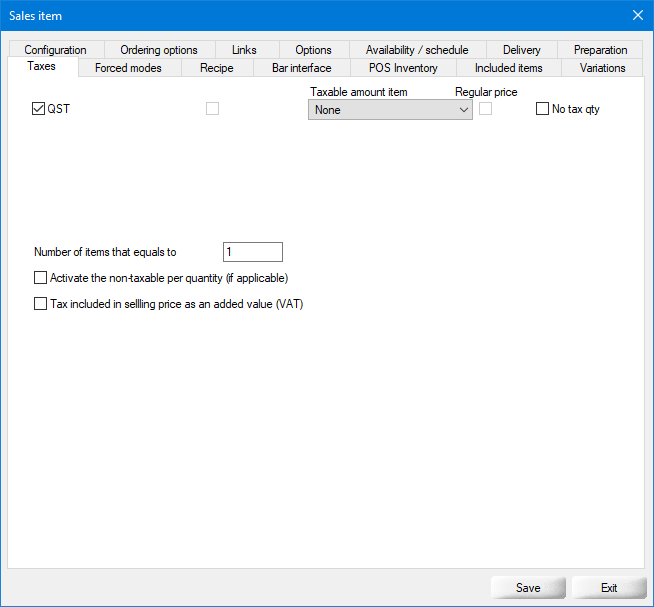
Taxes list
All the taxes configured in Point of sales control > Invoice > Taxes... will be displayed here. Select the tax(es) which apply to this item.
Taxable amount item
Use this drop-down list to select another item to determine the price used to calculate the tax. This is useful when you setup an item that is included with a combo at no additional charge, but which needs to be taxed. For instance, you sell a "Table d'Hôte" which includes a glass of wine. The glass of wine does not have its own price when included with the combo, but still needs to be taxed by a liquor tax. In the modifier or included item created for the wine, you would select the regular glass of wine, and the tax will be calculated on the normal price of the glass of wine when the combo is ordered.
Regular price
...
No tax qty
...
Number of items that equals to
...
Activate the non-taxable per quantity (if applicable)
Enable this option to apply the "Non taxable if item number over" rule to this item, as configured in the tax options.
Tax included in selling price as an added value (VAT)
Enable this option to calculate this tax as a Value Added Tax (VAT) where applicable.
Please go through each of the following topics to learn more about all the options contained in each tab of the sales items setup:
Related Topics
- Sales Item Setup - Configuration
- Sales Item Setup - Ordering Options
- Sales Item Setup - Links
- Sales Item Setup - Options
- Sales Item Setup - Availability - Schedule
- Sales Item Setup - Delivery
- Sales Item Setup - Preparation
- Sales Item Setup - Variations
- Sales Item Setup - Included Items
- Sales Item Setup - POS Inventory
- Sales Item Setup - Bar Interface
- Sales Item Setup - Recipe
- Sales Item Setup - Forced Modes
- Sales Item Setup - Taxes
